How to Spot a Fraud Email Link Before You Click
Fraud emails work because they are designed to feel urgent, familiar, and official.
A brand logo looks right. A button looks clean. The message says something important is waiting. And before you know it, the email is pushing you toward a link that should never have been trusted in the first place.
This guide is a practical checklist for checking suspicious email links before you click them. It is written for ordinary users, sellers, buyers, and anyone who receives emails that claim to involve money, delivery, account activity, or verification.
Why fraud emails are dangerous
A fraud email does not need to be sophisticated to be effective. It only needs to create enough pressure to make you click first and verify later.
Common goals include:
- stealing login credentials
- capturing card or banking details
- tricking you into approving a fake payment flow
- installing malicious software through a download
- collecting personal data for future scams
The most important thing to remember is this:
A page can look legitimate and still be fake. The domain is often the real warning sign.
The fastest way to check a suspicious link
Before opening an email link, pause and do these five checks.
1. Inspect the sender carefully
Do not trust the display name alone.
Check the actual address after the @ symbol.
Red flags include:
- strange domains with random letters or numbers
- extra words added to a brand name
- unusual top-level domains that do not match the official service
- a reply-to address that differs from the sender name
If the sender itself looks off, the message is already suspect.
2. Read the link destination, not the button label
Buttons can say anything:
- Confirm payment
- Withdraw funds
- View order
- Verify account
- Complete delivery
The text on the button is not the real destination. You need to inspect the actual URL.
On desktop, hover over the link and read the target carefully. On mobile, long-press the link and preview the destination before opening it.
If the domain is not the official brand domain, stop there.
3. Watch for urgency and emotional pressure
Scam emails usually try to make you act quickly. They may say:
- your payment is waiting
- your account will be suspended
- your order cannot be completed
- you must respond immediately
- you will lose money if you do not click now
Urgency is a tactic. It is not proof that the message is real.
4. Verify through the official app or website
Never rely on the email alone when money or account access is involved.
Instead:
- open the official app manually
- type the website address yourself
- use your saved bookmark if you already trust it
- check the in-app notification or account dashboard
If the event is real, it will also appear in the official product.
5. Never enter sensitive data from an unexpected email flow
If a link opens a page asking for any of the following, be cautious:
- password
- one-time code
- credit card number
- bank login
- wallet credentials
- identity documents
A legitimate service usually does not ask for sensitive information through a surprise email link.
Why fake pages can look real
Modern phishing pages often copy the appearance of a trusted service. They may reuse:
- brand colors
- icons and logos
- familiar form layouts
- short, convincing instructions
- professional-looking typography
That visual polish is exactly why people get tricked.
But the page design is only surface-level. The URL, ownership, and browser security indicators matter much more.
This means you should train yourself to think in this order:
- Is the sender trustworthy?
- Is the link destination legitimate?
- Does the page match the official domain and flow?
- Does the request make sense for this service?
If any of those answers is no, do not proceed.
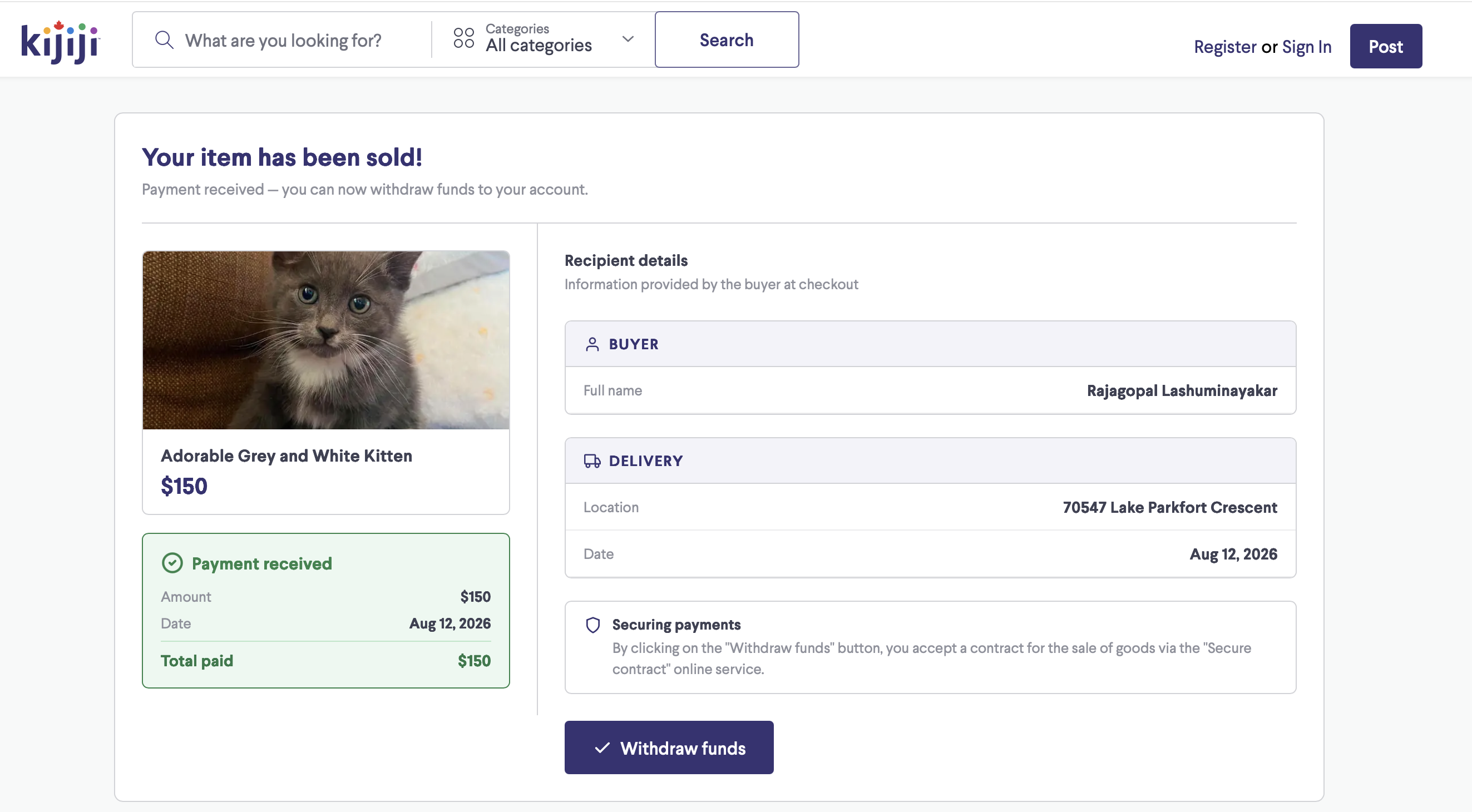
A real-world example: the fake payment page pattern
One common scam pattern happens right after someone posts an item for sale. The seller receives a quick email from a supposed buyer. Soon after, another email arrives saying the order has been completed or payment is ready.
The page then asks the seller to click a link to “withdraw” or “receive” funds.
That is a dangerous pattern because it combines three tricks:
- speed: the message comes immediately
- trust: it imitates a familiar marketplace process
- action: it pushes the user into clicking before checking the domain
If this happens to you, do not click the next step just because the page looks official. Use the platform directly and verify the activity from inside the real account.
What to do if you already clicked
Clicking a suspicious link is not always a disaster. What matters is what you did next.
If you clicked but did not enter any information:
- close the page immediately
- do not download anything
- clear the tab and review your browser history if needed
- avoid revisiting the page
If you entered a password or code:
- change the password for that account right away
- enable two-factor authentication if it is available
- sign out of other sessions or devices
- review account recovery settings
If you entered payment or banking information:
- contact your bank or card provider
- monitor transactions closely
- freeze or replace the card if necessary
- report the incident to the service you were impersonating
If the page downloaded a file, treat it seriously and scan your device.
A simple decision rule you can remember
When a message involves money, access, or urgency:
- Pause.
- Verify from the official source.
- Click only if the sender, domain, and context all match.
If even one part feels wrong, do not trust the link.
Safe habits that reduce phishing risk
A few habits will dramatically lower your exposure:
- Use a password manager that only autofills on correct domains.
- Turn on multi-factor authentication wherever possible.
- Keep your browser and operating system updated.
- Prefer direct app access over email links for payment or account actions.
- Treat unexpected messages as untrusted until verified.
- Tell family members or coworkers to double-check links before opening them.
Why this matters for everyone
Phishing is not only a technical problem. It is a human attention problem.
Scammers win when they can rush you. They lose when you slow down and verify.
That is why the most useful security skill is not memorizing every scam. It is building a repeatable habit:
- stop
- inspect
- verify
- proceed only when the link is clearly legitimate
Final reminder
A trustworthy-looking email is not the same as a trustworthy email. A polished page is not the same as a safe page. And a fast payment message is not the same as a real payment.
Think twice before clicking any email link, especially when the message involves money or urgency. The extra few seconds you spend checking the domain can save you from a costly mistake.